Table of Contents:
ToggleIntroduction
In today’s competitive market, online reviews play a crucial role in building trust and attracting new customers. Most people check reviews before choosing a restaurant, salon, shop, or service provider. That’s why Google Review Stands have become a powerful marketing tool for businesses.
A Google Review Stand makes it incredibly easy for customers to leave feedback instantly — helping you boost your online reputation and increase visibility.
What Are Google Review Stands?
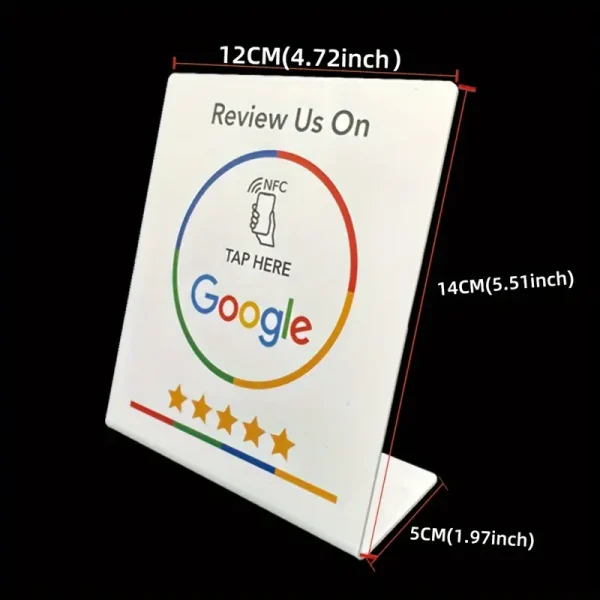
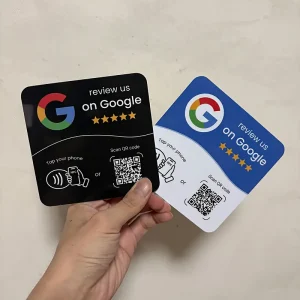
Google Review Stands are physical display stands placed in business locations that contain:
- A QR code linked to your review page
- An NFC tap feature (in some models)
- A call-to-action like “Scan to Leave a Review”
When customers scan or tap the stand, they are redirected to your Google Business Profile review page.
It eliminates the need for customers to search manually.
How Do Google Review Stands Work?
The process is simple:
- A QR code or NFC link is created for your Google review page.
- The code is printed or embedded into the stand.
- The stand is placed at checkout counters, tables, or reception desks.
- Customers scan or tap to leave a review instantly.
No apps. No complicated steps.
Why Google Reviews Are Important
Google reviews impact:
- Customer trust
- Local SEO rankings
- Visibility on Google Maps
- Conversion rates
- Business credibility
The more positive and recent reviews you have, the more likely new customers are to choose your business.
Benefits of Using Google Review Stands
1. Increase Review Volume
Making the process simple increases the number of reviews.
2. Improve Local SEO
More reviews can help improve your ranking in local search results.
3. Professional Appearance
A sleek stand looks more professional than a simple verbal request.
4. Higher Customer Engagement
Customers are more likely to act when the option is visible and convenient.
5. Reusable & Cost-Effective
One stand can generate hundreds of reviews over time.
6. Contactless & Hygienic
Perfect for modern business environments.
Best Places to Position Google Review Stands
For maximum results, place your stand:
- At the checkout counter
- On restaurant tables
- At the reception desk
- Near the exit
- In waiting areas
- At trade shows or events
Visibility increases action.
Who Should Use Google Review Stands?
Google Review Stands are ideal for:
- Restaurants & cafés
- Salons & barbershops
- Retail stores
- Real estate agencies
- Clinics & healthcare providers
- Gyms & fitness studios
- Hotels & travel businesses
- Service-based companies
Any business that depends on reputation can benefit.
Tips to Get More Reviews
- Ask satisfied customers immediately after service
- Add a clear call-to-action like “Scan to Leave Us a Review”
- Train staff to encourage feedback politely
- Keep the stand clean and noticeable
- Deliver excellent service — great reviews follow naturally
Google Review Stands vs Traditional Review Requests
Method | Easy for Customer | Instant Access | Higher Response Rate |
Verbal Request | No | No | Low |
Email Follow-Up | Medium | Medium | Moderate |
Google Review Stand | Yes | Yes | High |
Convenience drives action.
Conclusion
Google Review Stands are a simple yet powerful way to increase customer feedback and strengthen your online presence. By making it effortless for customers to leave reviews, you build trust, improve local SEO, and attract more business.
If you want more 5-star reviews without complicated marketing strategies, a Google Review Stand is a smart investment.
Frequently Asked Questions (FAQs)
1. What is a Google Review Stand?
It is a physical display stand with a QR code or NFC feature that directs customers to your Google review page.
2. How do customers use a Google Review Stand?
Customers scan the QR code or tap the NFC-enabled stand with their smartphone to open the review page instantly.
3. Do customers need an app to leave a review?
No. The review page opens directly in the browser or Google Maps.
4. Where should I place my Google Review Stand?
Place it at checkout counters, reception desks, tables, waiting areas, or near exits for maximum visibility.
5. Can I customize the stand design?
Yes. You can include your logo, brand colors, and a strong call-to-action message.
6. Does it work with all smartphones?
QR codes work on nearly all smartphones. NFC works on most modern Android devices and newer iPhones.
7. Will it improve my Google ranking?
More positive and consistent reviews can improve your local search visibility over time.
8. Is it reusable?
Yes. You can use the stand indefinitely to collect reviews.
9. Is it safe for customers?
Yes. It only redirects customers to your official Google review page and does not access their personal data.
10. Is it suitable for small businesses?
Absolutely. It is especially helpful for local businesses that rely on reputation and word-of-mouth marketing.






Reviews
There are no reviews yet.